Concept
What zero standing privilege is
Also written zero standing privileges, abbreviated ZSP, and also called zero standing access. All three name the same principle.
The idea is one sentence long. Almost everything interesting about it is in what the sentence rules out.
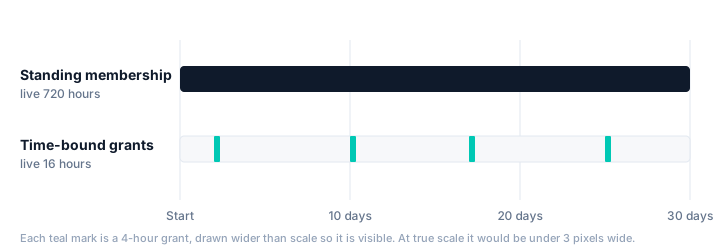
Zero standing privilege, equally zero standing privileges, means no account holds privileged access when it is not being used. Privilege is not assigned to people and left there; it is granted for a specific task, for a bounded time, and removed automatically when that time ends.
Zero standing access names the same principle after what is withheld rather than after what is granted. Where the two are distinguished at all, privilege is the elevated subset and access is everything an account can reach; for the principle described here they are used interchangeably.
The word doing the work is standing. It does not describe how much access someone has. It describes how long they have it for, and the answer is meant to be "only while they are using it".
How it differs from least privilege
These get used interchangeably and they are not the same thing. They constrain different axes, and you can satisfy either one completely while failing the other.
| Least privilege | Zero standing privilege | |
|---|---|---|
| Constrains | How much access an account has | How long an account has it |
| The question it answers | "Does this person need this permission at all?" | "Does this person need it right now?" |
| Satisfied by | A tightly scoped role | An empty account between tasks |
| Fails when | Roles are broad because narrow ones are laborious | Access is granted correctly and never removed |
A perfectly least-privileged administrator is still an administrator at three in the morning on a Sunday, six months after the project that needed them. The permission set is defensible; the fact that it is switched on is not. That gap is the whole reason the second idea exists.
The reverse is also true and less often said. An account that holds a wildly excessive role for eleven minutes a quarter is a smaller target than one holding a modest role permanently, but it is not least privilege and nobody should claim it is. The two ideas are complementary, and a serious program wants both: scope the role properly, then stop leaving it on.
What it actually requires
Stated as a goal, zero standing privilege is easy to agree with and easy to not have. Four things have to be true, and the fourth is the one that gets skipped.
- A path to elevate. If getting access takes a ticket and a day, people keep standing access, and they are right to — you have made the safe option the one that stops work.
- A decision. Someone or something has to say yes. For genuinely sensitive access that is a human; for routine access an automatic yes with a record is usually better than a rubber stamp that trains everyone to click approve.
- An expiry chosen at grant time. Not "we will review it" — an end timestamp written down when the access starts, because that is the only moment anyone knows what the task is.
- A removal that cannot fail. This is the hard half and the half that gets built last. Everything above is a request form; without a revocation path that runs unattended and is not allowed to be skipped, you have built a nicer way to grant permanent access.
A system that grants time-bound access but whose removal can be blocked — by a quota, a license state, an unpaid invoice, a queue that silently stopped — converts every temporary grant into a permanent one. It will look like it is working the entire time, because granting is the visible half. The only way to know is to check that access actually went away, which is why an audit of removals matters more than an audit of grants.
Where it does not apply
Any honest treatment of this has to say where the idea stops, because a program that claims one hundred percent is either lying or has quietly created exceptions nobody is tracking.
- Break-glass accounts. Every environment needs at least one identity that works when the elevation system does not. It holds standing privilege by design. The control is that it is few, monitored, alarmed on use, and credentialed separately — not that it does not exist. An approver who is not answering is a different emergency, and it needs different glass.
- Service and workload identities. A nightly job cannot request access and wait for approval. These want scoped, rotated credentials and their own review cycle, which is a different problem with different tooling.
- Systems with no API. If access can only be granted by a person clicking in a console, it can only be removed by a person remembering to. That is a procurement constraint on your estate rather than a policy failure.
Naming those three up front is what makes the rest credible. The goal is that the exceptions are a short, known list, not an unbounded set discovered during an incident.
How TemprBac approaches it
TemprBac grants access as time-bound packages — a named bundle of groups across the systems you already run, requested by the person who needs it, approved if the package requires it, and revoked automatically when the window closes. Groups and roles are the primitive on purpose: every system worth governing expresses access that way, which is what lets one expiry cover several systems at once.
The fourth requirement above is a product invariant rather than a feature: nothing may block revocation. No plan limit, no quota, no billing state can stop access from expiring, because a cap that could stop revocation would silently undo the whole point. Pricing covers what the limits do affect.